


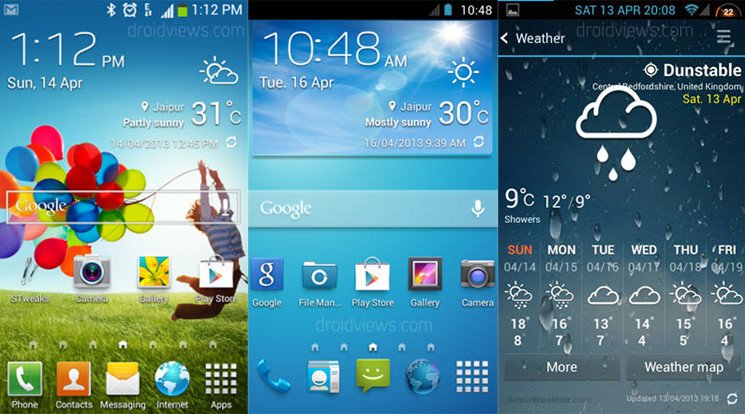
smartphone running under Android Jelly Bean.
Occasionally after rooting and installing an AOSP-derived ROM, you may become nostalgic and want a taste of the OEM-skinned life. OK, we’ll admit it: The main reason why most users root and install a custom ROM is to remove the TouchWizes and Senses that mar our overall Android experience in the first place.

That said, there are some who genuinely enjoy the aforementioned custom UIs. And if you’re one who cares for Samsung’s TouchWiz, specifically the version emulating the look found on the Galaxy S 4, you’re in luck.
So far it has been tested and reported working on AOSP-derived ROMs such as CM10 and CM10.1, as well as various manufacturer-skinned releases. It has resources for XXHDPI, XHDPI, HDPI, and MDPI devices.
Installation instructions
If you want to install touchwiz launcer on your device with accu weather widget follow the following instructions click here via XDA developers
You need to just install the suitable zip on your android phone
Whom I install ?
What is XXHDPI, XHDPI, HDPI, and MDPI
ldpi ~120dpi.
mdpi ~160dpi
hdpi ~240dpi.
xhdpi ~320dpi.
xxhdpi ~480dpi
Model                   | Android Version | Density
Advent Vega             |      2.2        |  mdpi

Asus Transformer Prime  |      4.0        |  hdpi

Freelander PD10         |      4.0        |  hdpi

Google Galaxy Nexus     |      4.0        |  xhdpi
Google Nexus One        |      2.3        |  hdpi
Google Nexus S          |      4.0        |  hdpi
Google Nexus 4          |      4.2        |  xhdpi
Google Nexus 7          |      4.1        |  tvdpi (but will scale down your hdpi assets)
Google Nexus 10         |      4.2        |  xhdpi (Launcher icon xxhdpi)

HTC Desire              |      2.2        |  hdpi
HTC Desire S            |      2.3        |  hdpi
HTC Desire X            |      4.0        |  hdpi
HTC Desire HD           |      2.3        |  hdpi
HTC Doubleshot          |      2.3        |  hdpi
HTC Glacier             |      2.3        |  hdpi
HTC Nexus One           |      2.3        |  hdpi
HTC Hero                |      2.1        |  mdpi
HTC Legend              |      2.1        |  mdpi
HTC Sensation           |      2.3        |  hdpi
HTC One                 |      4.2        |  xhdpi
HTC One S               |      4.0        |  hdpi
HTC One X               |      4.0        |  xhdpi
HTC One X+              |      4.1        |  xhdpi
HTC One V               |      4.0        |  hdpi
HTC Tattoo              |      1.6        |  ldpi
HTC Wildfire            |      2.1/2.2    |  mdpi

Huawei Blaze            |      2.3        |  mdpi

LG Nexus 4              |      4.2        |  xhdpi
LG Optimus S            |      2.2        |  mdpi
LG Optimus Sol          |      2.3        |  hdpi
LG Optimus One          |      2.2        |  mdpi
LG Optimus V            |      2.2        | mdpi
LG Optimus 3D           |      2.3        |  hdpi

Motorola Atrix          |      2.3        |  hdpi
Motorola Defy           |      2.3        |  hdpi
Motorola Defy Mini      |      2.3        |  mdpi
Motorola Droid          |      2.0-2.2    |  mdpi
Motorola Droid 3        |      2.3        | hdpi
Motorola Flipout        |      2.1        |  ldpi
Motorola Razr           |      2.3        |  hdpi
Motorola Xoom           |      3.1/4.0    |  mdpi
Motorola Xoom2          |      3.2        |  mdpi

Sony X10 Mini           |      2.1        |  ldpi
Sony X10i               |      2.3        |  hdpi
Sony Xperia Arc S       |      2.3        |  hdpi
Sony Xperia P           |      2.3        |  hdpi
Sony Xperia Play        |      2.3        |  hdpi
Sony Xperia Pro         |      4.0        |  hdpi
Sony Xperia S           |      2.3        |  xhdpi
Sony Xperia X8          |      2.1        |  mdpi
Sony Xperia Z           |      4.2        |  xxhdpi

Samsung Epic 4G         |      2.2        |  hdpi
Samsung Galaxy Ace      |      2.2        |  mdpi
Samsung Galaxy S        |      2.3        |  hdpi
Samsung Galaxy S II     |      2.3        |  hdpi
Samsung Galaxy S III    |      4.0        |  xhdpi
Samsung Galaxy S 4      |      4.2        |  xhdpi
Samsung Galaxy S 4 Active |      4.2        |  xhdpi
Samsung Galaxy Tab 7"   |      2.2        |  hdpi
Samsung Galaxy Tab 10"  |      3.0        |  mdpi
Samsung Galaxy Tab 2 10"|      4.0        |  mdpi
Samsung Galaxy Nexus    |      4.0        |  xhdpi
Samsung Galaxy Note     |      2.3        |  xhdpi
Samsung Galaxy Note 2   |      4.1        |  xhdpi
Samsung Nexus 10        |      4.2        |  xhdpi
Samsung Nexus S         |      4.0        |  hdpi

ZTE Blade               |      2.3        |  hdpi
ZTE Libra | 2.2 | hdpi How to install
1. Download the launcher with proper resolution for your device and transfer it your root of SD card (not in any folder for convinience)
2. Backup your current ROM from “backup and restore” option in recovery (for safety but you can skip this step)
3. Go to "Advanced" and "Wipe dalvik cache" (do it before and after installation)
4. Now select "Install zip from sdcard" and then select the downloaded file and flash it
5. Go to "Advanced" and "Wipe dalvik cache” once again.
6. Get back and Reboot
Enjoy


0 comments:
Post a Comment