


Have you ever wanted to have verified profile badge after your twitter name Of course you have! Now you can make your Twitter profile look like it's verified, just like professionals , Just follow this tutorail and you can make your profile like verified badge
With Twitter's new header, you can now upload a cover photo onto your profile to be seen online and on mobile devices.

Just click here and change your header with the images below to get "verified" in seconds!
So i give you three different cover photos depend on your name length
Use this one for average sized names:
This one for smaller names:
And this one for longer names:
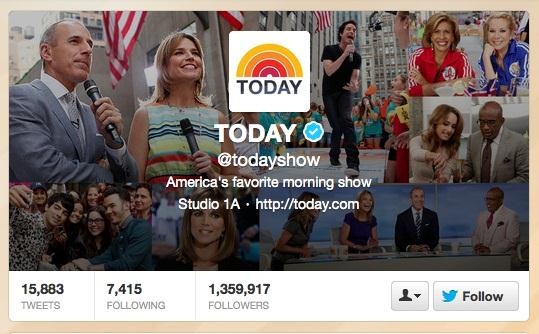
This is what a real verified Twitter account looks like
The above images that i give you are around 520 x 260 pixels, but Twitter recommends the dimensions be 1200 x 600 for decent quality, so the verified icon doesn't look too blurry. To make your own custom one, just open up your background photo wanted in Photoshop (or whatever you used) and resize it to 1200 x 600, then insert the Twitter verified logo
Use this as a prank to make your friends fool :)
You can also done that type of tutorial to get your facebook page verified or profile so comment and subscribe Facebook tutorial will be soon
But be careful
"Misuse of Twitter Badges: You may not use a Verified Account badge or Promoted Products badge unless it is provided by Twitter. Accounts using these badges as part of profile photos, header photos, background images, or in a way that falsely implies affiliation with Twitter will be suspended."
So, be careful. They could possibly ban you


0 comments:
Post a Comment